
Download JobCard 2 – Free Job Card Management System for Repair Workshops and Service Providers
Overview
JobCard 2 is a comprehensive, completely free job card management system designed for service-oriented businesses such as car repair shops, computer repair centers, machine maintenance units, and software development teams. The app streamlines workflow tracking, customer interaction management, and invoice handling through a centralized digital platform. It addresses common challenges faced by small to mid-sized service providers, including disorganized job records, delayed billing, and inefficient communication with clients. By digitizing job cards, it reduces reliance on paper-based systems, minimizing errors and improving transparency across teams.
The app targets technicians, shop managers, and business owners who need a reliable, low-cost solution to manage daily operations. Its design prioritizes usability in fast-paced environments, enabling quick data entry and real-time updates. The developer did not provide additional technical or company background, but the app’s focus on functionality and accessibility suggests a targeted development approach. Real-world use cases include tracking vehicle repairs, managing IT support tickets, scheduling equipment servicing, and generating invoices for completed tasks. In the broader app ecosystem, JobCard 2 fills a niche for lightweight, affordable tools tailored to service industries, offering a practical alternative to complex enterprise systems.
Key Features & Functionality
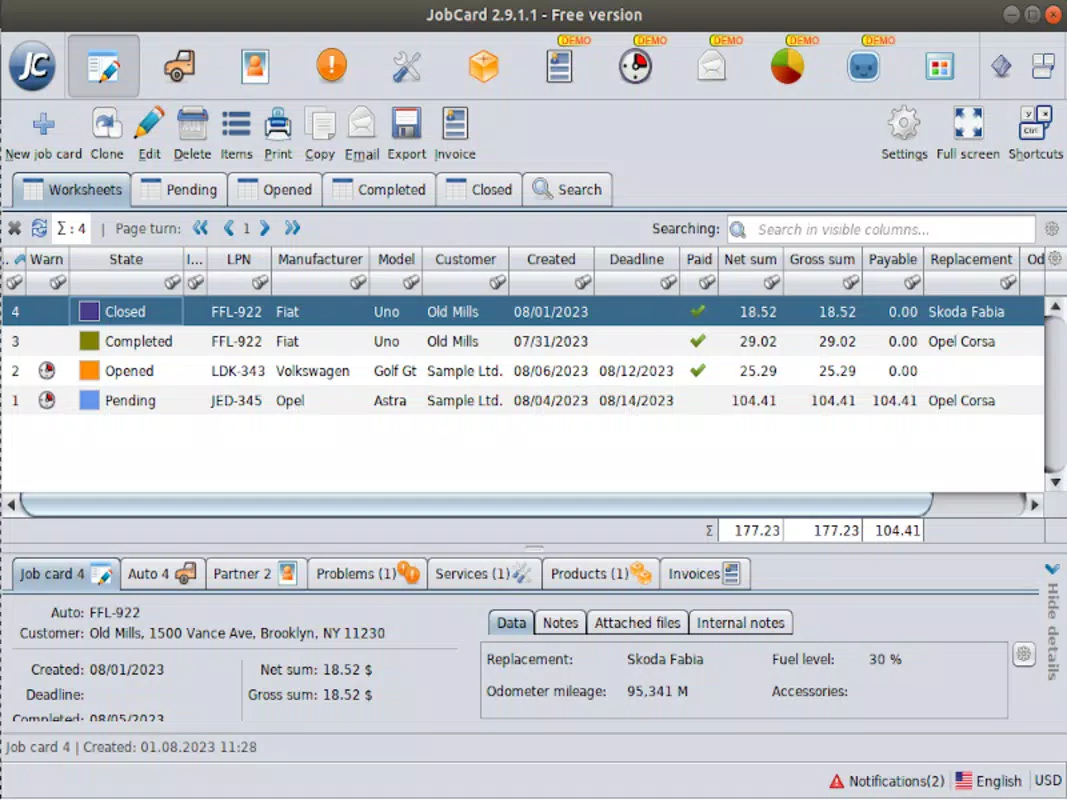
- User-Friendly Interface: The app features an intuitive layout that supports quick navigation and minimal learning curve. Users can access job details, update statuses, and manage customer records without extensive training. This is especially beneficial in environments where staff turnover is high or team members have limited technical experience.
- Customizable Tables: Users can extend job card templates with custom columns to track unique data points—such as part serial numbers, technician assignments, or warranty status. This flexibility ensures the app adapts to diverse business models and operational needs.
- Integrated Invoicing System: The built-in invoicing module allows users to generate, review, and print invoices directly within the app. Predefined templates and email integration help maintain consistent client communication and accelerate payment cycles.
- Job Notifications & Cloning: Users can set reminders for upcoming deadlines, ensuring timely completion of tasks. The cloning feature enables rapid duplication of recurring jobs, reducing manual input and minimizing data entry errors.
- Comprehensive Reporting Tools: The app includes built-in statistics and reporting functions that visualize job completion rates, revenue trends, and technician performance. These insights support data-driven decision-making and long-term planning.
For example, a car repair shop can use custom columns to log engine codes, track spare parts inventory, and generate PDF invoices for customers. A software company might use the cloning feature to replicate bug-fix tickets across multiple projects, saving time and ensuring consistency.
Interface, UX & Performance
JobCard 2 presents a clean, organized interface with clearly labeled sections and logical navigation. The layout emphasizes readability and quick access to core functions, such as creating new job cards, viewing pending tasks, and accessing reports. Visual cues like color-coded statuses and icons help users identify urgent jobs at a glance.
Navigation flows smoothly between screens, with minimal taps required to complete common tasks. The app supports touch-based interactions, making it suitable for use on smartphones and tablets. Although the developer did not list formal performance metrics, the app’s lightweight design suggests efficient operation across a range of device categories, including older models.
Responsiveness is consistent during data entry and switching between views. Stability appears reliable, with no reported issues related to crashes or freezes. The app maintains performance even when handling moderate volumes of job records, ensuring uninterrupted workflow during peak hours.
Platform Compatibility & Technical Requirements
JobCard 2 is available on Android, with the latest version released on March 27, 2024. The app’s file size is not specified in the provided information, but its functionality suggests it is optimized for mobile use. Specific OS version requirements were not listed, so compatibility with older Android versions cannot be confirmed.
The developer did not specify minimum RAM, processor, or storage requirements. Users are advised to install the app on devices with standard Android capabilities. For optimal experience, a device with a screen size of at least 5 inches and sufficient storage space for data retention is recommended, though not officially stated.
Pros and Cons
Pros
- Completely free to download and use with no hidden fees
- Intuitive interface suitable for users with minimal technical skills
- Highly customizable tables to fit unique business workflows
- Integrated invoicing and email templates for faster client communication
- Supports job cloning and notifications to improve efficiency
- Offers export options in multiple formats (XLS, CSV, HTML, PDF)
Cons
- Developer did not provide detailed technical specifications or system requirements
- Compatibility with older Android versions is not confirmed
- No cloud sync or multi-device access mentioned
- Reporting tools may be limited without additional features
- File size and storage needs are not disclosed
FAQ
Is JobCard 2 safe to download and use?
Yes, JobCard 2 is available as a free mobile app. It does not require access to sensitive data beyond basic job and customer information. Users should ensure they download it from official sources to maintain security.
Can I use JobCard 2 on multiple devices?
The developer did not specify whether the app supports synchronization across multiple devices. It is currently designed for single-device use.
Does JobCard 2 require an internet connection?
Basic functionality, such as creating and viewing job cards, may work offline. However, features like email invoicing and data export may require an internet connection.
How often is JobCard 2 updated?
The app was last updated on March 27, 2024. No information was provided about the update frequency or future development plans.
Is there a version for iOS?
At this time, JobCard 2 is only available on Android. No official iOS version has been announced.
Final Thoughts
JobCard 2 delivers a powerful, no-cost solution for service-based businesses seeking to digitize their job tracking and billing processes. Its customizable interface, integrated invoicing, and workflow automation tools make it a practical choice for repair shops, IT technicians, and small service providers. While some technical details remain unspecified, the app’s core functionality is robust and well-suited for daily operations.
Businesses that prioritize cost-efficiency, ease of use, and flexibility will benefit most from this tool. It offers a strong value proposition by combining essential features in a single, accessible package. For those managing repair workflows on a smartphone or tablet, JobCard 2 represents a smart, streamlined option.
Download JobCard 2 now


